Wednesday, February 10, 2010

Computer assisted Chinese (part IV): Touchscreen 2

I want to use Skritter with a pen, not a mouse. Commercial products are too expensive for me, so I want to make something using a touchscreen.

While I plan to eventually use a cheap Nintendo touchscreen, I want to start with a touchscreen that I already have, one that used to be in my EeePC. This way, I don't have to deal with as many variables at once.

The interface board for this touchscreen usually speaks to a proprietary kernel module, and proprietary X driver. I would rather not use proprietary software, as proprietary software doesn't let me change things if I need to.

Once upon a time, X was configured with a file called /etc/X11/xorg.conf. This file was a description of all the input and output devices that X had to speak to. You could tell X about a device such as a touchscreen, by having an InputDevice stanza in /etc/X11/xorg.conf, which would cause X to load a driver for that input device. The touchscreen maker provides a proprietary driver for this purpose.

Those days are now gone. In Fedora (and probably in other recent Linux distributions), there's no longer an /etc/X11/xorg.conf file. Instead, it's all done with auto-detection.

The Linux kernel has a subsystem called evdev. It unifies handling of keyboards and pointing devices (and can even "mix" different input devices into one virtual device). The kernel contains drivers for many input devices, which use the services of evdev. One of those drivers is for the touchscreen I have. And for each input device, there'll be a device file in /dev/input.

To start off, I did an ls of /dev/input for files matching event*:
mjd@blackcat [/] ls /dev/input/event*
/dev/input/event0  /dev/input/event2  /dev/input/event4
/dev/input/event1  /dev/input/event3  /dev/input/event5
After I plugged in the touchscreen, I saw this:
mjd@blackcat [/] ls /dev/input/event*
/dev/input/event0  /dev/input/event2  /dev/input/event4  /dev/input/event6
/dev/input/event1  /dev/input/event3  /dev/input/event5
So it appears that /dev/input/event6 is the device file for the touchscreen. I ran evtest on this device: (evtest is in the evtest package)
[root@blackcat /]# evtest /dev/input/event6
Input driver version is 1.0.0
Input device ID: bus 0x3 vendor 0xeef product 0x1 version 0x100
Input device name: "eGalax Inc. USB TouchController"
Supported events:
  Event type 0 (Sync)
  Event type 1 (Key)
    Event code 330 (Touch)
  Event type 3 (Absolute)
    Event code 0 (X)
      Value    249
      Min        0
      Max     2047
    Event code 1 (Y)
      Value   1397
      Min        0
      Max     2047
Testing ... (interrupt to exit)
Event: time 1265760809.718325, type 1 (Key), code 330 (Touch), value 1
Event: time 1265760809.718331, type 3 (Absolute), code 0 (X), value 246
Event: time 1265760809.718332, type 3 (Absolute), code 1 (Y), value 1390
Event: time 1265760809.718335, -------------- Report Sync ------------
Event: time 1265760809.770319, type 3 (Absolute), code 1 (Y), value 1389
Event: time 1265760809.770322, -------------- Report Sync ------------
Event: time 1265760809.810320, type 3 (Absolute), code 1 (Y), value 1388
Event: time 1265760809.810325, -------------- Report Sync ------------
Event: time 1265760809.822320, type 3 (Absolute), code 0 (X), value 303
Event: time 1265760809.822322, type 3 (Absolute), code 1 (Y), value 1331
Event: time 1265760809.822326, -------------- Report Sync ------------
Event: time 1265760809.834320, type 3 (Absolute), code 0 (X), value 331
Event: time 1265760809.834322, type 3 (Absolute), code 1 (Y), value 1303
Event: time 1265760809.834326, -------------- Report Sync ------------
Event: time 1265760809.846321, type 3 (Absolute), code 0 (X), value 403
Event: time 1265760809.846323, type 3 (Absolute), code 1 (Y), value 1235
Event: time 1265760809.846326, -------------- Report Sync ------------
Event: time 1265760809.878320, type 1 (Key), code 330 (Touch), value 0
Event: time 1265760809.878326, -------------- Report Sync ------------
^C
[root@blackcat mjd]# 
When I touch the touchscreen, I get data! And the data looks sensible, with values for each axis from 0-2047!  Now to get it working with X...

Tuesday, February 9, 2010

Computer assisted Chinese (part III): Dictionary

The second project stems from my deep unhappiness with the Chinese electronic dictionaries that are out there.  Most of them are aimed at Chinese people learning English, not westerners learning Chinese, and they really suck.  The only thing more awful than the software that's generally on them is the horrid dictionary databases in use.  If there are five ways of saying the same thing, how do we know which one is right for the situation?  And which are current and not archaic?

When I've read English dictionaries for Chinese people, the English seems about 100 years old and quite laughable.  I get the same impression when trying to find words I want in a Chinese-English dictionary:  It's not clear which one I want, and when my Chinese friends see my choice, they just tell me "oh, we don't use that word".  Pah.  And don't get me started about how inflexible the searching is.  I should have the ability to click on a character, break it down into components, then see other words with the same components.  That will help me sort out whether I want 青、晴、清、情,or 请!

When I'm online, I'm constantly using the dictionary at MDBG. It's aimed at Chinese for westerners, and the English descriptions are carefully worded so that in general, it's possible to tell which of the five ways of saying something you actually want. And seeing which HSK level a word is rated at also gives an idea of how common it is.

  http://www.mdbg.net/chindict/
 http://en.wikipedia.org/wiki/HSK_test

This website uses the CC-CEDICT database, which can be downloaded and used for free! Since I like the database so much, I've been dreaming of writing my own Chinese dictionary program which uses that database. And I intend to turn that dream into reality. But in order to do that, I need a platform to run it on.

I have looked around, and I've decided to write it for the Nintendo DS. This is a mature platform, with 4M of RAM, two nice screens, long battery life, a free toolchain, a GUI library, and as much read-only data as you can fit on an SDHC SD card. And cheap too: I picked up a grey market one the other day for A$130.

  http://en.wikipedia.org/wiki/Nintendo_DS_homebrew

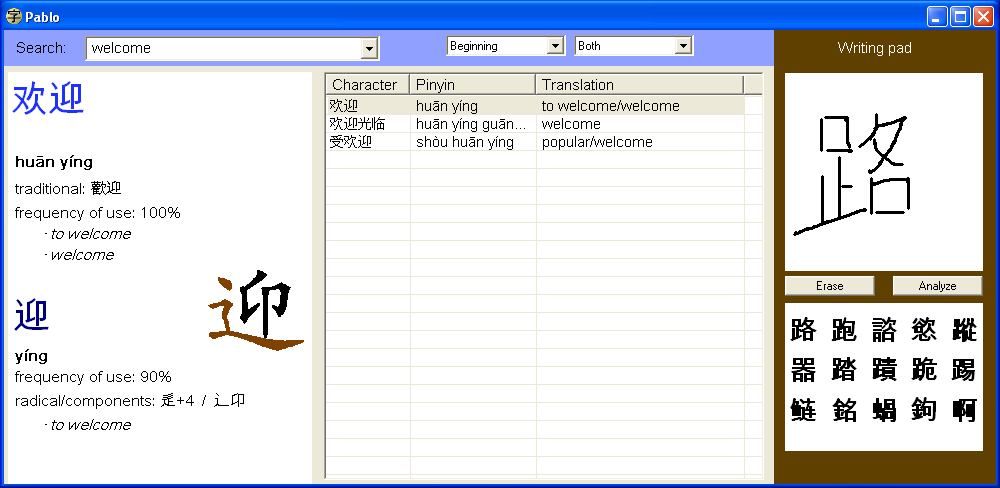
As far as a user interface goes, I am thinking of making it work somewhat like this program called Pablo:

  http://ehaton.blogspot.com/2007/02/learning-chinese-pablo-my-personal.html
  http://haton.free.fr/chino/pabloscreenshot.jpg

There are also some free handwriting recognition engines which I plan to try, with a view to giving my dictionary handwriting recognition:

  http://www.tegaki.org/
  http://www.kiang.org/jordan/software/hanzilookup/
  http://hanzirecognizer.sourceforge.net/
  http://zinnia.sourceforge.net/

The DS doesn't come with a UI library, so I would either have to write that myself, or use someone else's.  I am intending to use the "Woopsi" library:

  http://ant.simianzombie.com/?page_id=128

I think my first task will be to port my Chutor program from J2ME to the DS.  As well as being useful in it's own right, it will be a good test of the UI library, and my ability to port Java to C++.

Once that's done, I will move onto doing the dictionary program.  I'm likely to leave the handwriting recognition to last.

Computer assisted Chinese (part II): Touchscreen 1

In learning Chinese, I want computers to assist me in two ways. The first is in learning Chinese characters, and the second is as an in-class dictionary/reference.

The first is just a follow-on step from my flashcards and Chutor phone program. But I need to get smarter about how I learn characters. For that reason, I'm using Skritter, a great web service which uses spaced repetition to teach you characters:

  http://www.skritter.com/

To use Skritter, you have to write Chinese characters in an on-screen scribble area.  You can do this with a mouse, but it's fiddly, and I think it's not very good for your wrist, as you're using wrist muscles to try and get the fine motor control you usually get with your fingers on a pen.

A better solution is to use some kind of pen input device.  This is a much more natural way of doing things.  Commercial pen input devices are far too expensive in Australia (at least A$60 for an entry level model).  So I am thinking of using one of these extremely cheap touchscreens, which are intended as replacements for the Nintendo DS:

  http://www.dealextreme.com/details.dx/sku.3245

Eventually I want to read this touchscreen with a small microprocessor, and present this to the computer as a USB touchscreen.  For the moment, I'm going to take a number of half-way steps.

The first half-way step is to start with the larger, commercial touchscreen that used to be inside my EeePC.  The touchscreen size is 15cm by 9cm, which is a lot bigger than I need, but it already has a working controller board.

Once I have that working, I plan to move to one of the smaller replacement touchscreens, and use an Arduino to make it appear as a USB device.

  http://www.arduino.cc/

I think if I can get all this working, I can replace the Arduino with a smaller dedicated micro, put it in a nice, flat case, and make a pen input device for about A$20.

Second project in next post.

Computer assisted Chinese (part I)

I am learning Chinese.  Since I hate doing things by hand that can be automated (and because it's much more fun to hack with the the computer than do work), I like to use the computer to help me whenever I can.

For me, the hardest thing about Chinese is learning the characters.  Unless you're actively learning and reviewing them every day, you're forgetting.  And the techniques I've seen my classmates use (such as just writing them a few times) doesn't seem to help me.

When I was learning Chinese in 2005, I typed the word list from each chapter of the textbook into my computer.  From this, I could print the lists on labels, and make flash cards.  Each flash card had the Chinese character and the pinyin (pronounciation) on one side, and the English meaning on the other.  It took a lot of time to enter the characters, and a lot of time to make the flash cards, but I found it a very effective way of learning.  I'd stick a bundle about 6cm x 4cm and 3cm high into my pocket, and be all set to learn when I had some free time, such as waiting for a train.

I'd start with all the cards in my hand, and look at each one in turn.  If I knew the card (for example, I could write the character from memory, given the meaning and the pronunciation), I'd remove that card from my hand, and put it on my discard pile.  Otherwise I'd move that card to the back of the pile I was holding.  The cards I knew well would quickly leave my hand, and my time would be spent working on the ones I didn't know.  For reasons I don't fully understand, some characters are easy for me to remember, and others give me such trouble.  It was years before I could remember to write such every-day things as 喜欢 and 意思!  When I'm learning, I might need to see some cards ten times before it will finally sink in.

What I had implemented was a real-world form of a "spaced repetition" learning system, and it worked really well for me:

  http://en.wikipedia.org/wiki/Spaced_repetition

The drawback of this approach, as well as the preparation time, is that I ended up with a bag of some 22 bundles, which is a pile around 60cm high!  That was quite unwieldy to carry around, so I'd have to put some thought into the bundles I wanted to carry, and leave the rest at home.

After a while I got tired of the physical nature of the cards, so I decided to do it with a computer program.  But lugging around a laptop is not really an option!  What could I run the software on?

I eventually decided to write the app as a J2ME Java app, as J2ME programs will run on most phones.  Over the course of 2007, I worked on the program when I had some spare time (mostly on the train).  I finally released the program in 2007 as "Chutor", which is a portmanteau of "Chinese Tutor".

  http://sf.net/projects/chutor
 
It shipped with the word lists from the New Practical Chinese Reader volumes I, II and III, because that was the textbook I was using at the time, but it can be tailored to take any vocab.  When I was in China in 2008, I reworked it to use the vocab of the textbooks were were using there.

Although the program has a number of non-critical bugs, I find it very convenient for reviewing characters when I have a few spare minutes:  waiting for a train, or for a few minutes before going to sleep (and yes, learning characters is very effective at inducing sleep).

The missing feature I'd like most is spaced repetition (although I really want and need it, and adding it wouldn't be hard).  At the moment, if you get a character right, that character gets dropped until you go and select a new set of chapters.  But even so, the program is useful enough.

Give Chutor a try on your phone.  Does it work for you?  Does it help?

Monday, February 8, 2010

First post!

Well, hardly surprising as it's my blog :-)

I've created this blog to put tech stuff in that wouldn't appeal to the sort of people who read my other blog. Expect stuff about electronics, creative spaces, Linux and coding.